Your meeting app and macOS
Many meeting apps have captions of their own, so look there first. In FaceTime, click the More button during a video call, then click Live Captions.
For any other app, macOS Live Captions (System Settings → Accessibility → Live Captions) captions spoken audio on Macs with Apple silicon. It captions either your Mac’s audio or your microphone, and you switch between them from its window or its menu bar icon.
With Live Subtitles
Live Subtitles captions the call’s audio as your Mac plays it, so it works the same in Zoom, Teams, Google Meet or a browser tab. Nothing joins the meeting — no bot, no extra participant — and your headphones work as usual.
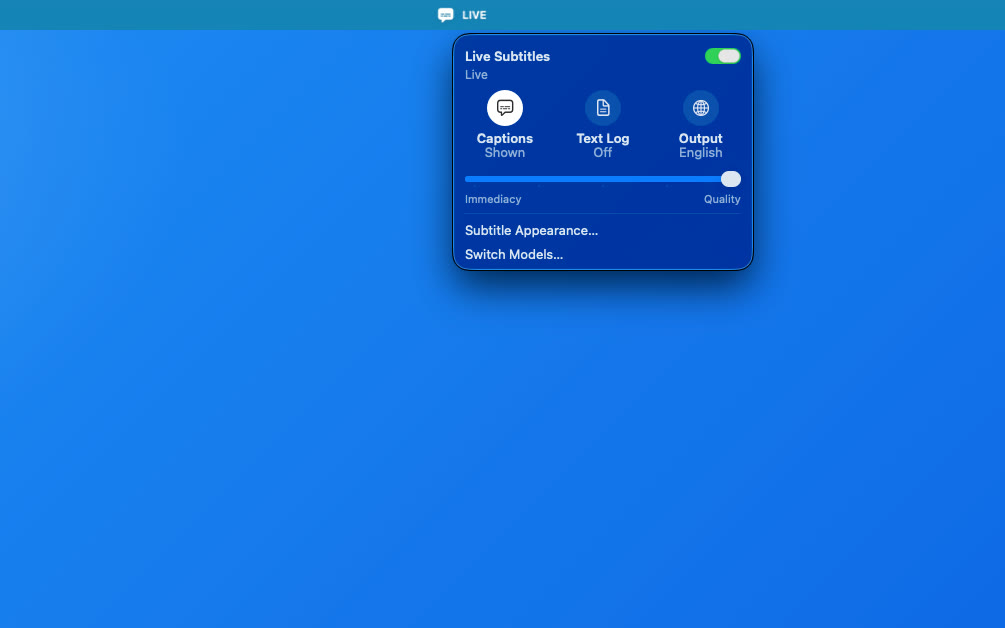
- Click the Live Subtitles icon in the menu bar and turn on the switch in its card, or press ⌃⌘S — before the call or during it.
- Join the call as usual. What the others say appears at the bottom of your screen.
- If the call is in a language you don’t follow, choose a language from the Output tile and the captions arrive translated.
- For notes afterwards, click the Text Log tile and save a new text file. The captions go into it with timestamps.
- Need your screen clear? Click the Captions tile or press ⌃⌘H to hide the captions — Live Subtitles keeps listening, and the log keeps going. Turn off the switch when the call ends.
Watch this step in the Live Subtitles guide 0:39
Good to know
Live Subtitles listens only to what your Mac plays, never the microphone, so your own words aren’t in the captions or the transcript.
If you keep a transcript, let the others know — your workplace or local law may have rules about it. The audio itself is never saved, only the caption text, and only while logging is on.