What macOS lets you change
Modifier Keys, under Keyboard Shortcuts, covers Caps Lock, Control, Option and Command. Each gets a pop-up menu where you choose another modifier, Escape or No Action, and Restore Defaults puts them all back.
App Shortcuts, in the same window, gives a menu command a new key combination: choose the app, type the command exactly as it appears in the menu, then press the shortcut. Apple notes that it works only for existing menu commands, not for general tasks such as opening an app.
Neither lets an ordinary key — a letter, a number, Return or Tab — send a different key.
The Terminal route
Apple’s Technical Note TN2450 describes hidutil, a command-line tool that maps one key to another using each key’s hardware usage code. It can change any key, but you work with hexadecimal codes rather than key names, and the mapping is lost when your Mac restarts, so it has to be set again each time.
With Key Remappings
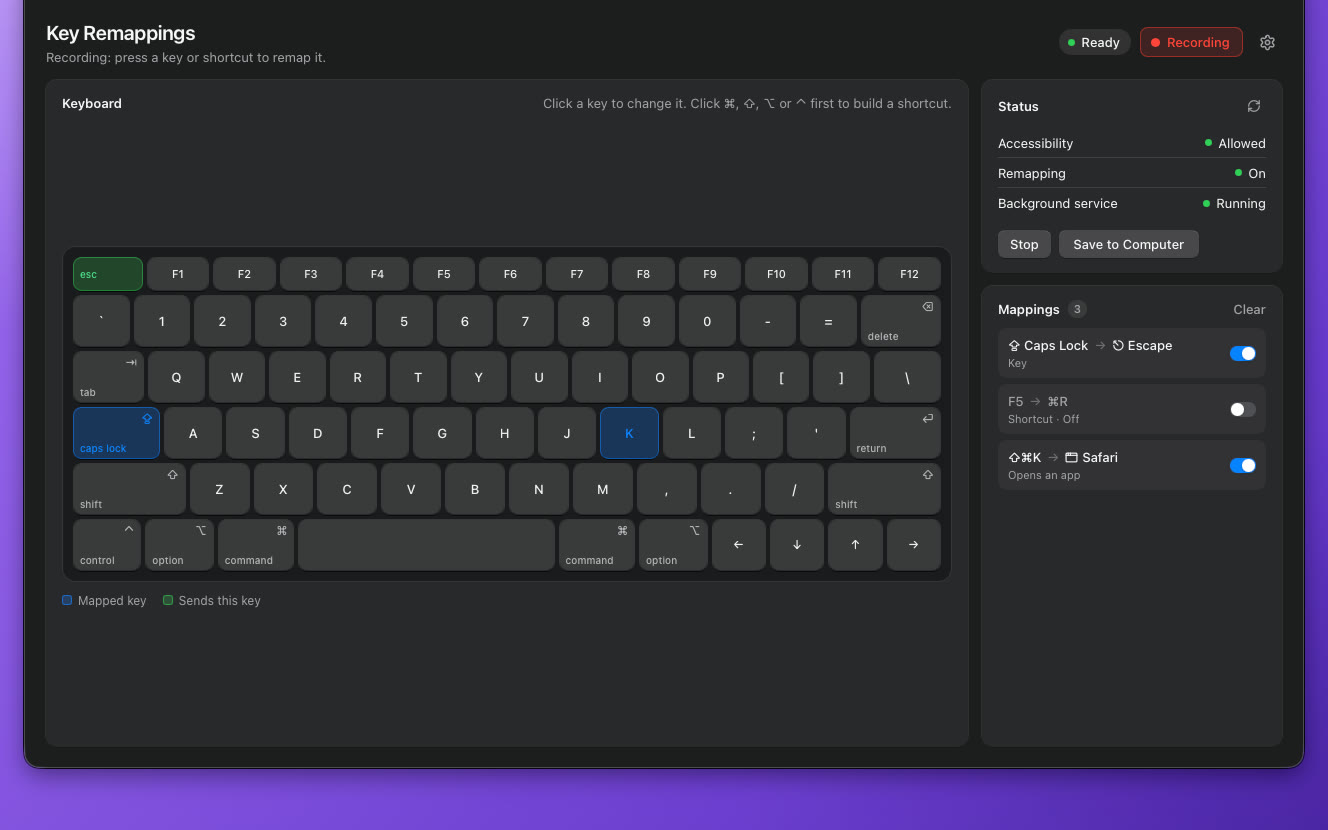
Key Remappings shows your keyboard on screen. Keys you’ve remapped glow one colour and the keys they send glow another, so you can see what’s in effect at a glance.
- Choose Allow Accessibility… and enable Key Remappings in System Settings → Privacy & Security → Accessibility. Return to the app; it checks automatically.
- Click the key you want to change. For a shortcut, click ⌘, ⇧, ⌥ or ⌃ first, then the key.
- Click the key or shortcut it should send instead.
- Check the summary and click Add Mapping.
Watch this step in the Key Remappings guide 0:08
Record with your real keyboard
Prefer pressing keys to clicking them? Turn on Record, press the key or shortcut you want to change, then press what it should send. Modifiers, function keys and Caps Lock are captured as you press them, and Record stays on, so you can map several in a row.
Each mapping is listed as trigger → destination. Pause one with its dot, or delete it with a click. Choose Allow Accessibility… and enable Key Remappings in System Settings → Privacy & Security → Accessibility. The app checks automatically. Once access is allowed, Save to Computer keeps your mappings working after you quit; wait for the saving confirmation.